

AI Agent Node
The AI Agent node invokes an LLM to interpret conversation context, generate a response, optionally call tools, and choose an exit path.
AI Agent is the node to use when the workflow needs language reasoning rather than a fixed deterministic step. It is often the main conversational brain inside a branch.
When to choose AI Agent
Section titled “When to choose AI Agent”Use AI Agent when the workflow should:
- answer a question in natural language,
- decide what to ask next,
- choose whether a tool is needed,
- interpret user intent before routing onward, or
- branch through exit conditions based on reasoning.
If the workflow already knows exactly what action must happen, use Tool, Function, or If/else instead.
How the node works in a workflow
Section titled “How the node works in a workflow”- The node receives the current conversation and workflow context.
- It applies the configured prompt, model, and tool access rules.
- It may call tools if they are available and the prompt makes that appropriate.
- It produces a response or structured reasoning outcome.
- It continues through the connected default or exit-condition output path.
In many workflows, AI Agent is the step that translates raw user input into the next business decision.
What to configure
Section titled “What to configure”- Model and provider settings decide how the node generates output.
- Temperature and max tokens shape response variability and length.
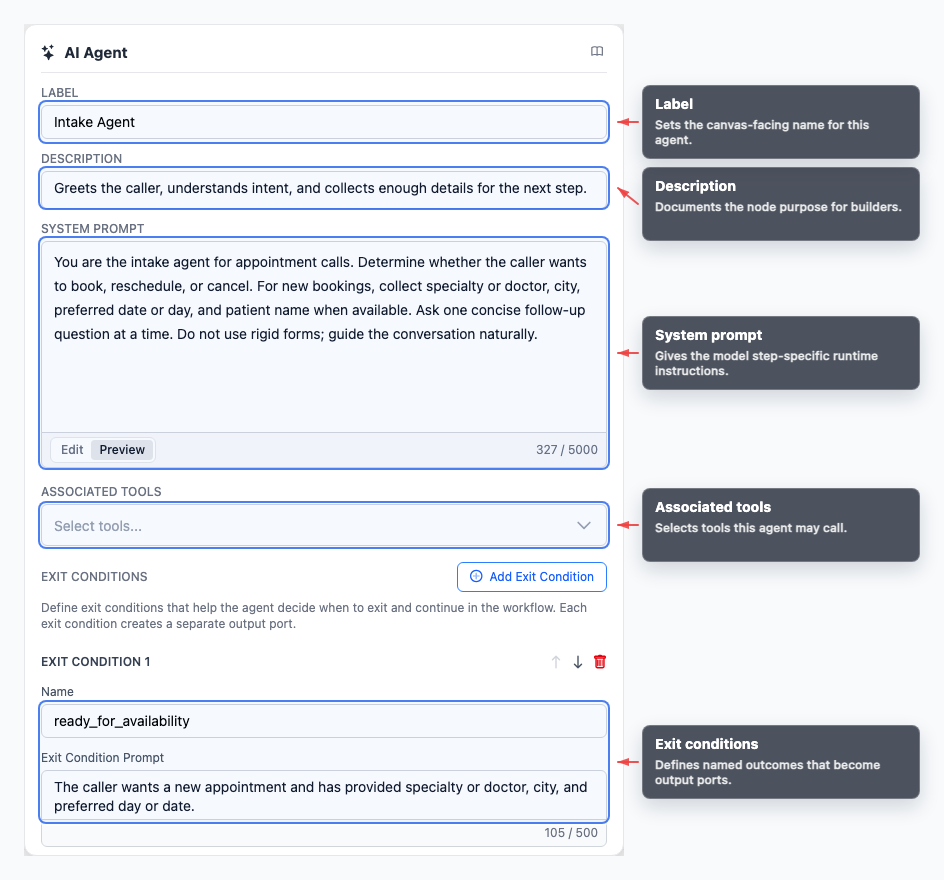
- System prompt tells the node how it should behave at this point in the workflow.
- Tools define which integrations the node may call while reasoning.
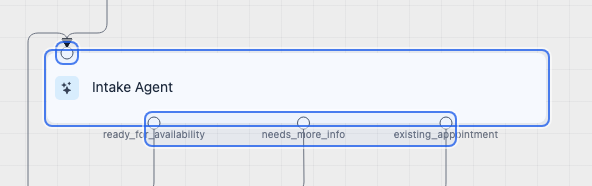
- Exit conditions create named outcomes that appear as output ports on the canvas.
Keep the prompt focused on the job of this node, not the entire workflow. Smaller, role-specific prompts are easier to test and maintain.
Common workflow patterns
Section titled “Common workflow patterns”- Triage Route to support, billing, sales, or another branch through exit conditions.
- Tool-assisted answer Give the agent a tool and describe when it should call it.
- Clarifying question Ask for missing information before extraction, branching, or transfer.
- Escalation Route uncertain or high-risk cases to Transfer.
Example configuration patterns
Section titled “Example configuration patterns”- A routing-focused agent can expose exits such as
existing_incident,new_incident, andunsupportedwhen the workflow needs clear branch selection. - A heavier support agent can use a longer system prompt, several tools, and a single completion exit after the task finishes.
- A compact router can keep exits as simple as
readyandotherwhen all it needs to decide is whether the caller has provided enough detail.
Visual reference
Section titled “Visual reference”This example shows an intake-style agent with multiple exits and tool-aware configuration. The two screenshots cover the node on the canvas and the corresponding inspector.
Canvas
Section titled “Canvas”Use the canvas view to see how the node sits in the graph and where exit paths leave the node.
Inspector
Section titled “Inspector”Use the inspector to review the settings that control prompting, tool access, and routing behavior.
What to watch out for
Section titled “What to watch out for”- Avoid mixing too many responsibilities into one AI Agent prompt.
- Use explicit exit conditions only when downstream paths truly differ.
- Prefer a direct Tool node when the workflow should always call a specific integration.
- Test prompt, tool access, and exit-condition behavior together, not in isolation.
Should every workflow have an AI Agent node? Most conversational workflows do, but deterministic flows can rely more on Tool, Function, Wait, and If/else nodes.
How do exit conditions become branches? Each exit condition creates an output port. Connect each output port to the next node for that path.
Related pages
Section titled “Related pages”- Tools - create tools the AI Agent can invoke
- If/else node - use explicit conditional branching
- Testing and debugging - inspect agent responses and chosen paths