

Transfer Node
The Transfer node hands a voice conversation off to a configured Contact, such as a phone number or SIP endpoint.
Use Transfer when the caller should leave the automated workflow and reach a live person, queue, or another configured voice destination.
When to choose Transfer
Section titled “When to choose Transfer”Transfer is the right node when:
- a caller asks for a human,
- the workflow detects a risky or unsupported situation,
- a department-specific handoff is required,
- or the voice flow should escalate after another step fails.
This is primarily a voice handoff node. It is not the same as an inbound phone number or entry point.
How the node works in a workflow
Section titled “How the node works in a workflow”- Execution reaches the Transfer node.
- Octo looks up the configured contact or handoff target.
- The platform hands the voice conversation off through the telephony path.
- The automated branch stops or follows any intentionally designed post-transfer behavior.
Transfer is often the last meaningful automated step on that branch.
What to configure
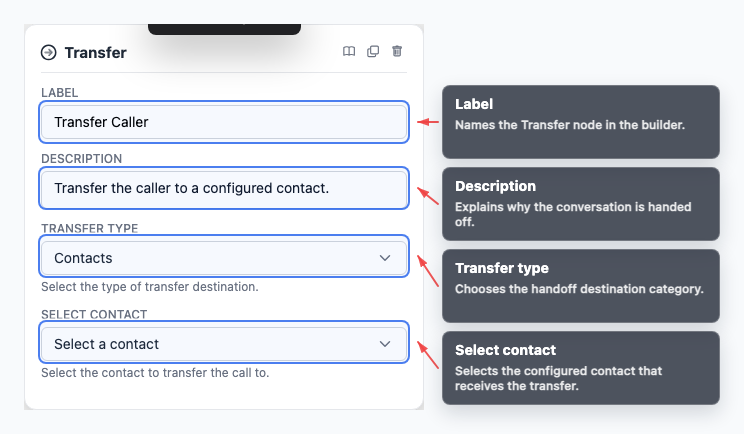
Section titled “What to configure”- Transfer type selects the handoff mode.
- Contact chooses the destination configured in Contacts.
- Label explains the purpose of the handoff on the canvas.
Name the node for the business outcome, such as “Transfer to billing queue” or “Escalate to support,” rather than only the contact name.
Common workflow patterns
Section titled “Common workflow patterns”- Human escalation Let AI Agent detect risk or uncertainty, then route to Transfer.
- Department routing Use If/else to send billing, sales, or support calls to different contacts.
- Fallback handoff Transfer when a tool fails or the caller explicitly asks for a person.
Example configuration patterns
Section titled “Example configuration patterns”- A contact-based handoff uses
transferType: contactsand keeps the destination explicit in the builder. - It is often clearer to keep the transfer step separate from the routing node that decided escalation was necessary.
Visual reference
Section titled “Visual reference”Canvas
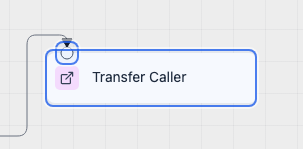
Section titled “Canvas”The canvas view shows where the workflow leaves the automated path and hands off the conversation.
Inspector
Section titled “Inspector”The inspector is where you choose the transfer mode and target destination.
What to watch out for
Section titled “What to watch out for”- Transfer is an outbound handoff step, not an inbound routing step.
- Confirm the destination contact exists and is correct before publishing.
- Do not assume chat or web flows support the same handoff behavior as voice.
- Most transfer branches should not continue with more automated steps unless the call flow is designed for that explicitly.
Is Transfer the same as a Phone Number? No. Phone Numbers are inbound endpoints for entry points. Contacts are outbound destinations for Transfer.
Can chat workflows use Transfer? Transfer is documented as a voice handoff pattern. Use channel-specific handoff behavior only when the product flow supports it.
Related pages
Section titled “Related pages”- Contacts - manage transfer destinations
- Phone Numbers - manage inbound voice numbers
- Entry Points - route calls into workflows