

If/else Node
The If/else node branches workflow execution by evaluating configured conditions and routing to the matching output path.
Use If/else when the workflow should branch on explicit, readable conditions instead of relying on language reasoning. It is best when reviewers should be able to inspect the routing logic directly on the canvas.
When to choose If/else
Section titled “When to choose If/else”Choose If/else when:
- the branch depends on known fields or deterministic values,
- the routing rules should be auditable and easy to review,
- the order of conditions matters,
- or the workflow needs a clear fallback path.
If the branch decision depends on natural-language judgment, use AI Agent exit conditions instead.
How the node works in a workflow
Section titled “How the node works in a workflow”- Execution reaches the If/else node.
- Conditions are checked in order.
- The first matching branch is selected.
- If no earlier condition matches, the Else branch runs when configured.
- The workflow continues through the selected output port.
This node works best when the input is already structured, usually from AI Extraction or Function.
What to configure
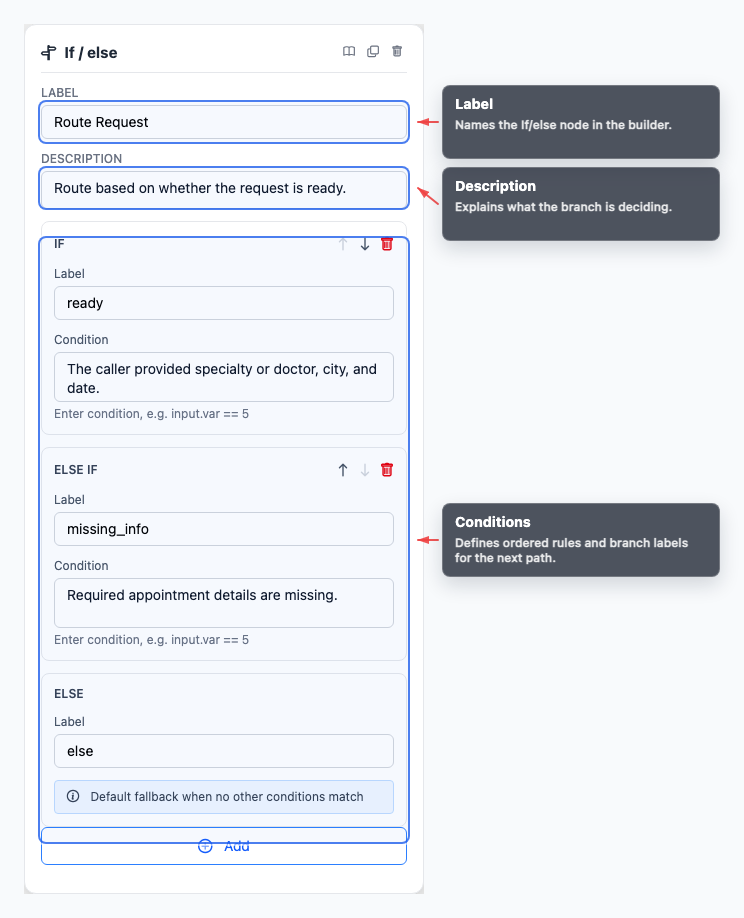
Section titled “What to configure”- Conditions define the if and else-if rules.
- Else branch provides the fallback route when nothing else matches.
- Labels name the output paths so the graph stays readable.
Put the most specific conditions first and leave the broadest or safest fallback for the end.
Common workflow patterns
Section titled “Common workflow patterns”- Priority routing Send urgent cases to Transfer and lower-priority cases to another automated step.
- Field validation Route missing or invalid extracted data to a clarification path.
- Channel behavior Separate handling for voice, chat, or other workflow contexts.
Example configuration patterns
Section titled “Example configuration patterns”- An If/else node can branch on a computed value such as
${nodes.parity.output.parity}when the decision should be fully deterministic. - Labels like
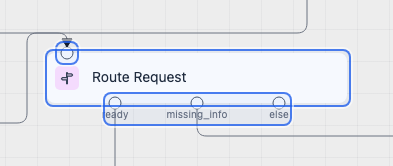
ready,missing_info, andelsemake complex routing easier to review on the canvas.
Visual reference
Section titled “Visual reference”Canvas
Section titled “Canvas”The canvas view shows how each configured branch becomes its own output path.
Inspector
Section titled “Inspector”The inspector is where you define conditions, set their order, and label the resulting branches.
What to watch out for
Section titled “What to watch out for”- Condition order matters.
- Most branches should still have an Else fallback.
- Branch on clean, structured values whenever possible.
- Keep labels readable so downstream routing remains obvious in the graph.
Does order matter? Yes. Put specific conditions before broad conditions so the intended branch matches first.
Should every If/else have an Else branch? Usually yes. Else gives the workflow a safe fallback when data is missing or unexpected.
Related pages
Section titled “Related pages”- AI Extraction node - extract values before branching
- Function node - prepare deterministic branch input
- Testing and debugging - verify every branch path